Dr. Partha Majumder is a Gen-AI product engineer and research scientist with a Ph.D. from IIT Bombay. He specializes in building end-to-end, production-ready Gen-AI applications using Python, FastAPI, LangChain/LangGraph, and Next.js.
Core stack
Python, FastAPI, LangChain/LangGraph, Next.js
Applied Gen-AI
AI video, avatar videos, real-time streaming, voice agents
In the previous part of this CUDA C++ series, we explored the CUDA programming model and learned how the CPU (host) and GPU (device) work together. We also discussed how memory is explicitly managed to support GPU execution.
In this article, we shift our focus to how computation itself is organized on the GPU. CUDA achieves massive parallelism by breaking work into small pieces and distributing them across thousands of threads. The structure that makes this possible is known as the CUDA thread hierarchy.
Once you understand how threads, blocks, and grids work together—and how threads identify their work using indexing—CUDA programming becomes far more intuitive and predictable.
CUDA Thread Hierarchy
The CUDA thread hierarchy defines how parallel work is structured and scheduled on the GPU. Instead of executing a single instruction sequence, CUDA launches a large number of lightweight threads that execute the same code on different data elements.
This hierarchical organization allows CUDA programs to scale automatically across different GPU architectures while maintaining the same programming model.
Why Thread Hierarchy Matters?
Understanding the CUDA thread hierarchy is essential because it directly controls how work is divided, scheduled, and executed on the GPU. Every CUDA program relies on this hierarchy to map parallel threads to data correctly and to keep the GPU busy doing useful work.
When threads, blocks, and grids are organized properly, the GPU can execute massive workloads efficiently. When they are not, performance suffers and bugs become difficult to track down.
Here’s how the CUDA thread hierarchy impacts both performance and correctness:
Efficient GPU Parallelism: The CUDA thread hierarchy allows a single kernel launch to create thousands of lightweight threads. Because each thread performs a small, independent piece of work, the GPU can execute many operations at the same time, fully utilizing its parallel hardware.
Scalable Design: By organizing work into blocks and grids rather than targeting specific GPU cores, CUDA programs automatically scale across different GPUs. The same thread hierarchy works whether the GPU has a few multiprocessors or many, without changing the kernel code.
Better Resource Utilization: Threads grouped into blocks give the GPU scheduler flexibility. The hardware can assign blocks to streaming multiprocessors as resources become available, keeping execution units busy and minimizing idle time.
Correct Indexing and Data Access: Thread hierarchy provides a structured way to compute unique thread indices. This ensures that each thread processes the correct portion of data, avoiding overlaps, race conditions, and out-of-bounds memory accesses.
Threads, Blocks, and Grids
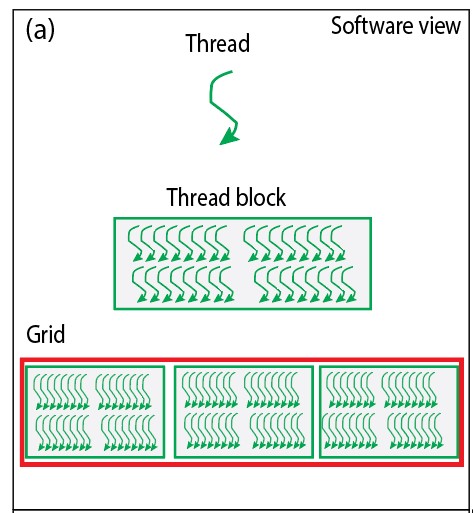
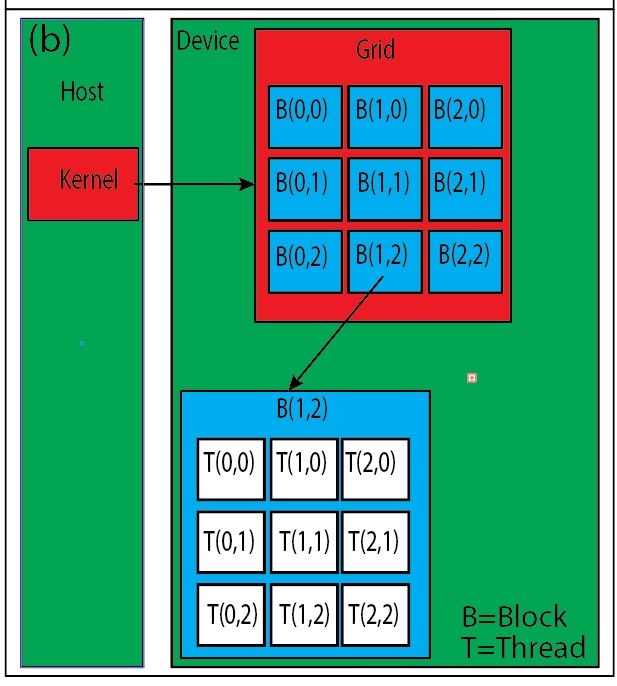
The CUDA thread hierarchy is built using three nested levels. Each level has a specific purpose in organizing parallel work (see Figure 1).
Fig. 1. (a) Thread hierarchy overview showing the relationship between grids, blocks, and threads (b) Detailed organization of threads within blocks and grids
Threads
A thread is the smallest unit of execution in CUDA. Every thread runs the same kernel code, but each operates on different data.
Threads are lightweight and plentiful, allowing CUDA to launch millions of them efficiently. This is what enables fine-grained parallelism on the GPU.
Threads are the smallest units of computation within CUDA. They are organized within blocks, and each thread runs a specific portion of the code. Threads are executed concurrently on SMs, and the order of execution might vary due to parallelism.
Thread Blocks
Threads are grouped into thread blocks. Threads within the same block can:
Synchronize execution
Share data using fast on-chip shared memory
Thread blocks are executed independently, which allows CUDA programs to scale automatically across different GPU architectures.
Grids
A grid is a collection of thread blocks launched for a kernel execution. The grid represents the total amount of parallel work to be performed.
By organizing blocks into a grid, CUDA allows applications to process very large datasets while keeping the programming model simple and consistent.
Thread Indexing in CUDA
To make parallel execution meaningful, each thread must know which data element it is responsible for. CUDA provides built-in variables that allow threads to identify themselves within the hierarchy.
The most commonly used variables are:
threadIdx.x: The index of the current thread within its block (0 to blockDim.x - 1).
blockIdx.x: The index of the current block within the grid (0 to gridDim.x - 1).
blockDim.x: The number of threads in each block.
gridDim.x: The total number of blocks in the grid.
Each variable has .x, .y, and .z components, allowing CUDA to support one-dimensional, two-dimensional, and three-dimensional execution configurations.
Thread indexing is what connects the CUDA thread hierarchy to actual data processing.
Calculating Thread Identifiers in One Dimension
In one-dimensional problems, a global thread identifier is commonly computed as:
int tid = blockIdx.x * blockDim.x + threadIdx.x;
How This Calculation Works
blockIdx.x is the index of the block within the grid.
blockDim.x is the number of threads per block (block dimension).
threadIdx.x is the index of the thread within its block.
By multiplying the index of the block by the number of threads per block (blockIdx.x * blockDim.x) and adding the index of the thread within its block (threadIdx.x), you get a unique thread identifier tid. This helps distinguish one thread from another and plays a crucial role in determining the specific task each thread should execute.
Calculating Thread Identifiers in Two Dimensions
Many CUDA applications work with two-dimensional data such as images or matrices. In such cases, thread indexing naturally extends to two dimensions.
This approach allows each thread to operate on a specific row and column of a two-dimensional data structure.
Illustrative Example Of Thread Identification
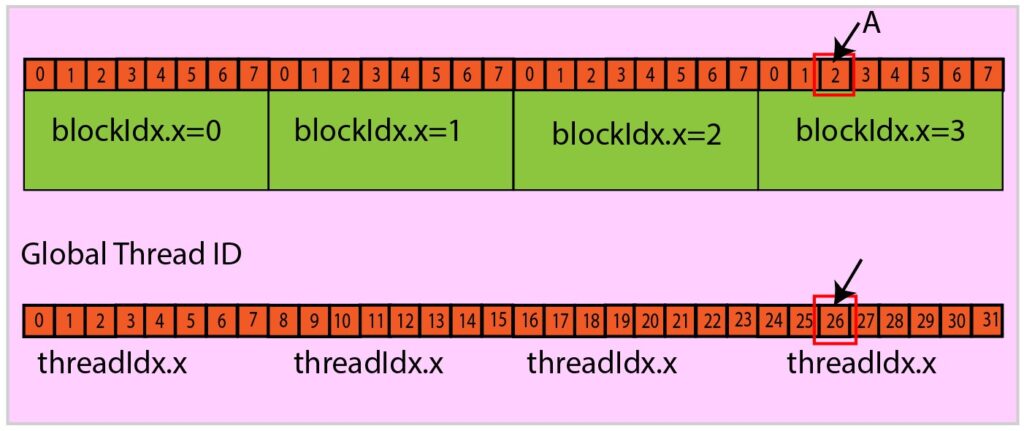
Consider a hypothetical setup with a one-dimensional grid and one-dimensional blocks: there are 4 blocks, and each block consists of 8 threads.
Let us try to compute the global thread ID of thread A as indicated in the figure (see Figure 2). For the thread A:
threadIdx.x=2, blockidx.x=3, blockDim.x=8.
Global Thread ID = blockIdx.x * blockDim.x + threadIdx.x = 3 x 8 + 2 = 26
Fig. 2. Thread identification example showing how to calculate global thread ID from block index, block dimension, and thread index
Writing a CUDA Kernel
A CUDA kernel is the fundamental building block of GPU programming in CUDA C++. Understanding how to write and structure CUDA kernels is essential for anyone learning GPU programming or parallel computing. In this section, we'll explore CUDA kernel development, from basic syntax to practical implementation patterns.
What is a CUDA Kernel?
A CUDA kernel is a special function that executes on NVIDIA GPUs and runs in parallel across thousands of threads. Unlike regular C++ functions, a CUDA kernel leverages the GPU's massive parallel architecture to perform computations simultaneously. When you launch a CUDA kernel, the GPU creates multiple instances—one for each thread—allowing true parallel execution that's impossible on traditional CPUs.
CUDA Kernel Declaration and Syntax
Every CUDA kernel function uses the __global__ execution space specifier, which tells the NVIDIA CUDA compiler that this function will:
Run on the GPU device
Be called from the host (CPU)
Execute in parallel across multiple threads
__global__ void kernel_name(parameter_list){ // Kernel code goes here // Each thread executes this code independently}
CUDA Kernel Programming Best Practices
When writing CUDA kernels, follow these key principles:
Thread Identification: Each thread must know which data to process using built-in variables
Boundary Checking: Always verify thread indices are within valid ranges
Memory Coalescing: Access memory in patterns that GPU hardware can optimize
Parallel Design: Structure work to maximize thread utilization
Practical CUDA Kernel Example: Parallel Array Addition
Here's a complete CUDA kernel example that demonstrates parallel array addition—a fundamental pattern in GPU programming:
__global__ void addArrays(int* a, int* b, int* result, int size) { // Calculate unique thread identifier int tid = blockIdx.x * blockDim.x + threadIdx.x; // Boundary check to prevent out-of-bounds access if (tid < size) { result[tid] = a[tid] + b[tid]; }}
This CUDA kernel showcases several important concepts:
Thread Indexing: Uses blockIdx.x, blockDim.x, and threadIdx.x for unique identification
Parallel Execution: Each thread processes one array element independently
Safety: Includes boundary checking to prevent memory access errors
Efficiency: Simple, parallelizable operation perfect for GPU acceleration
Explanation
The kernel is named addArrays, and it is defined with the **global** specifier, indicating that it will be executed on the GPU device.
The kernel takes four arguments: pointers to arrays a, ** b**, and ** result**, as well as an integer ** size**, which specifies the number of elements to process.
Within the kernel, each thread calculates its unique identifier tid by combining the ** blockIdx.x**, representing the block index, and ** threadIdx.x**, representing the thread index within the block. This identifier helps determine the element each thread will operate on.
If the tid is within the specified size, the thread adds the corresponding elements from arrays ** a** and ** b** and stores the result in the result array at the same index.
Launching a CUDA Kernel
A CUDA kernel can be launched from the host side using the following syntax:
dimGrid specifies the number of blocks in the grid.
dimBlock determines the number of threads per block.
kernel_arguments represents any arguments required by the kernel function.
Summary
In this CUDA C++ tutorial, we explored the fundamental concepts of thread hierarchy, indexing, and kernel programming. We learned how CUDA organizes parallel work through a structured hierarchy of threads, blocks, and grids, enabling massive parallel execution on NVIDIA GPUs.
Key takeaways from this tutorial:
Thread Hierarchy: CUDA uses a three-level hierarchy (threads → blocks → grids) to organize parallel work efficiently across GPU resources
Thread Indexing: Built-in variables like threadIdx, blockIdx, and blockDim allow each thread to identify its unique position and determine which data to process
Kernel Development: CUDA kernels are special functions marked with __global__ that execute on the GPU and run in parallel across thousands of threads
Best Practices: Proper boundary checking, memory coalescing, and parallel design are essential for efficient GPU programming
Practical Implementation: We saw how to write a complete CUDA kernel for parallel array addition, demonstrating real-world GPU programming patterns
Understanding these concepts provides the foundation for writing efficient, scalable CUDA applications that can leverage the full power of GPU acceleration.
What's Next
In the next part of this CUDA C++ tutorial series, we'll dive deeper into practical CUDA programming through hands-on coding examples. We'll explore:
Advanced Kernel Patterns: More complex parallel algorithms and optimization techniques
Memory Management: Deep dive into CUDA memory types (global, shared, constant, texture) and when to use each
Performance Optimization: Techniques for maximizing GPU utilization and minimizing bottlenecks
Real-World Applications: Applying CUDA concepts to solve actual computational problems
Debugging and Profiling: Tools and methods for identifying and fixing performance issues in CUDA code
These topics will build upon the thread hierarchy and kernel programming foundations established here, helping you become proficient in writing high-performance GPU applications using CUDA C++.