Overview
Ever wanted to build an AI assistant that gives clear, expert-level answers to your questions? That's exactly what we're building today!
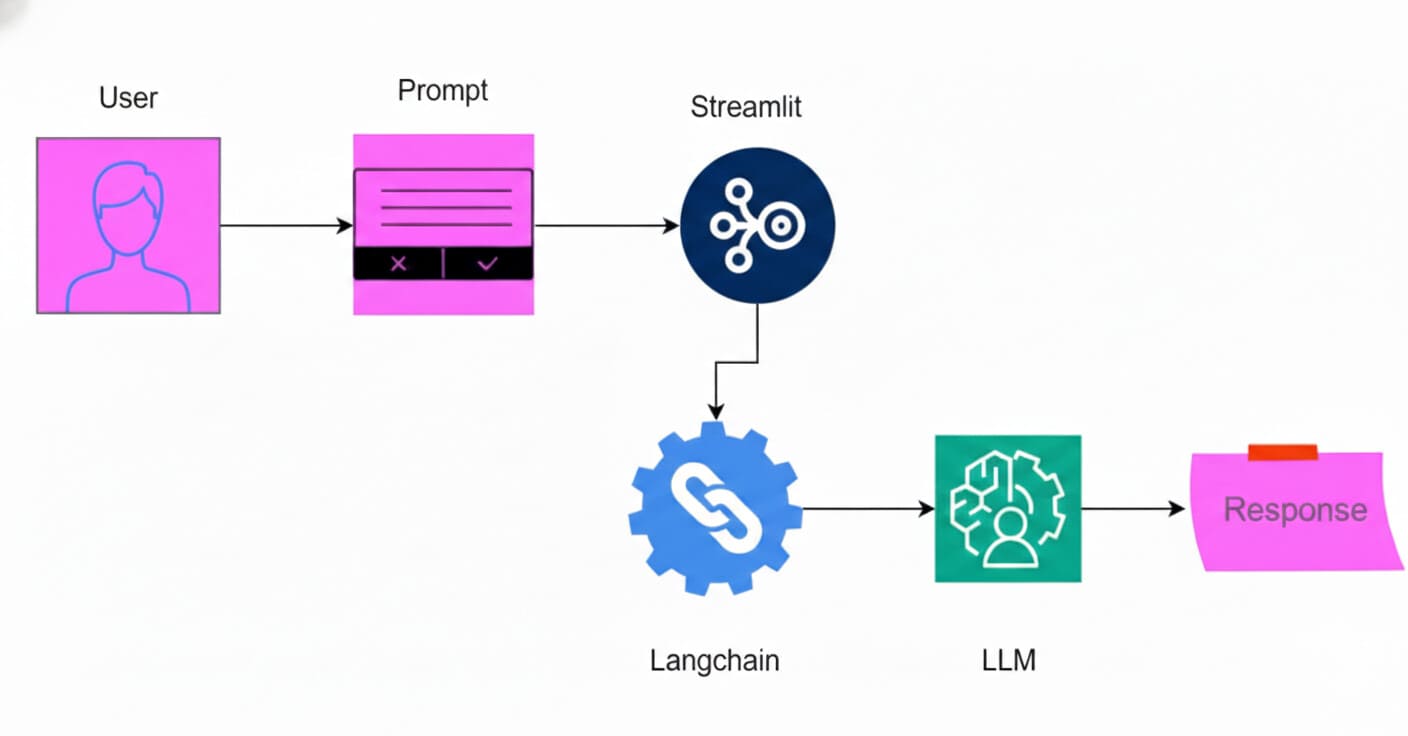
In this guide, we'll create a smart Q&A app using DeepSeek's powerful LLM, LangChain for connecting everything together, and Streamlit for a clean web interface. I'll walk you through building an AI assistant that delivers professional, high-quality responses using DeepSeek Llama 70B. Let's dive in!
Introduction
Before we start coding, let's quickly understand the three key tools we'll use. Knowing what each tool does will make our building process much smoother.
What is DeepSeek?
DeepSeek is a free AI chatbot that works just like ChatGPT but with some impressive advantages. It matches OpenAI's o1 model in math and coding tasks while being much more efficient—using less memory and costing far less to develop (just 100 million for GPT-4). Best of all? It's completely free to use, so you get advanced AI capabilities without any subscription fees.
What is LangChain?
LangChain is the "glue" that connects AI models to real-world tools. Think of it as a framework that lets you easily hook up LLMs like DeepSeek to data sources, add memory so your AI remembers conversations, and enable advanced reasoning. With LangChain, you can create AI agents that fetch live data, call APIs, and perform complex reasoning—all with minimal code. It's the go-to choice for building chatbots, search apps, document analyzers, and automation tools.
What is Streamlit?
Streamlit is your fast track to turning Python scripts into interactive web apps. Instead of wrestling with HTML, CSS, or JavaScript, you can create beautiful, data-driven apps with just a few lines of Python code. It's perfect for visualizing AI model outputs, building dashboards, and creating tools that showcase your work. Streamlit handles all the UI complexity so you can focus on what matters: your AI models and data.
Practical Implementation: Building Your AI Q&A App
Ready to code? Let's build our AI-powered Q&A app step by step. We'll use DeepSeek for the brain, LangChain to wire everything together, and Streamlit for the user interface. The flowchart below shows how these pieces fit together.
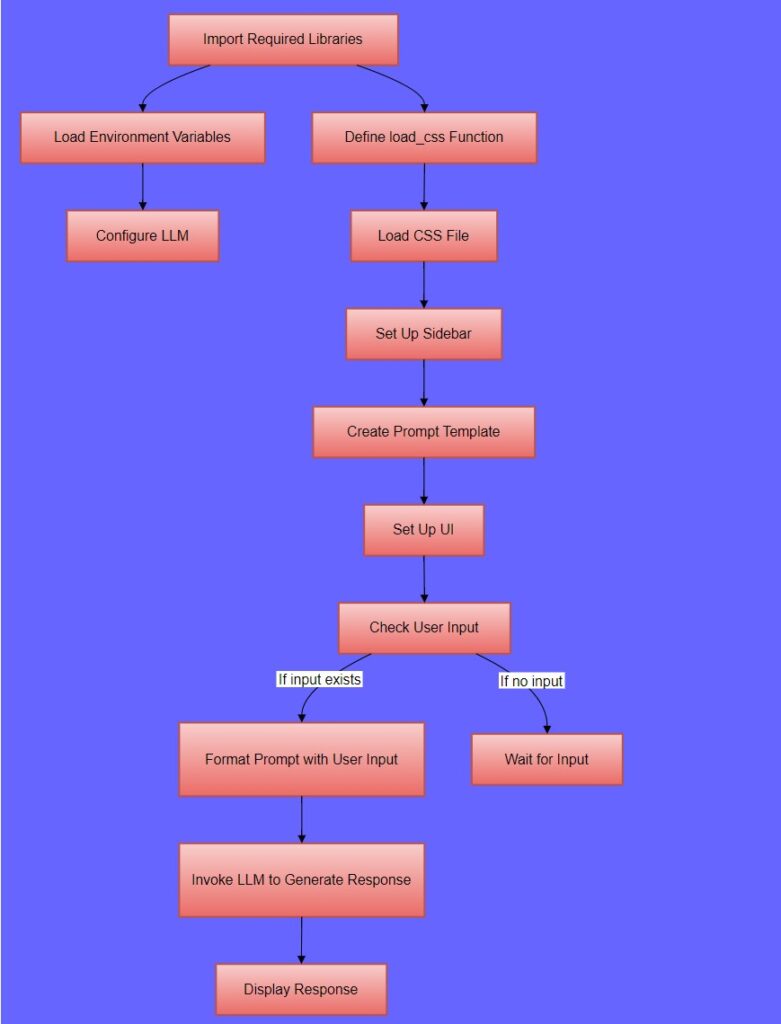
Figure 1: Flow of AI-Powered Q&A App with LangChain and DeepSeek
Step 1: Import Required Libraries
First, let's bring in all the tools we need:
import os
from dotenv import load_dotenv
import streamlit as st
from langchain_core.prompts import ChatPromptTemplate
from langchain_groq import ChatGroq
Explanation
-
os: This module provides a way to interact with the operating system, such as reading environment variables. -
dotenv: This library is used to load environment variables from a.envfile. -
streamlit: A framework used to create web applications with Python. It’s particularly useful for building data-driven apps. -
langchain_core.prompts: This module provides tools to create and manage prompts for language models. -
langchain_groq: This module allows interaction with the Groq API, which is used to access large language models.
Step 2: Set Up Your API Key
Now let's load your Groq API key from a .env file (never hardcode API keys!):
load_dotenv()
groq_api_key = os.getenv("GROQ_API_KEY")
Explanation
-
load_dotenv(): Loads environment variables from a.envfile into the environment. -
os.getenv("GROQ_API_KEY"): Retrieves the value of theGROQ_API_KEYenvironment variable, which is necessary to authenticate with the Groq API.
Step 3: Add Some Style
Let's make our app look good by loading custom CSS:
def load_css(file_name):
    with open(file_name, "r") as f:
        st.markdown(f"<style>{f.read()}</style>", unsafe_allow_html=True)
Explanation
load_css(file_name): This function reads a CSS file and injects its content into the Streamlit app usingst.markdown. Theunsafe_allow_html=Trueparameter allows HTML content to be rendered.
Loading CSS File
load_css("styles.css")Explanation
load_css("styles.css"): Calls theload_cssfunction to load and apply the styles fromstyles.cssto the Streamlit app.
Step 4: Create a Helpful Sidebar
Add instructions so users know how to use your app:
st.sidebar.title("ℹ️ Instructions")
st.sidebar.markdown("""
- Enter your question in the input box.
- The AI will generate an **expert-level** response.
- Uses **DeepSeek Llama 70B** model via Groq.
""")
Explanation
-
st.sidebar.title("ℹ️ Instructions"): Adds a title to the sidebar. -
st.sidebar.markdown(...): Adds markdown content to the sidebar, providing instructions to the user
Step 5: Design the AI's Personality
Set up a prompt template that tells the AI how to behave:
prompt = ChatPromptTemplate.from_messages([
    ("system", "You are an AI expert specializing in deep learning. Provide **detailed, structured, and well-researched responses** in a clear and professional manner."),
    ("user", "Question: {question}")
])
Explanation
ChatPromptTemplate.from_messages(...): Creates a prompt template with two messages: A system message that sets the context for the AI, instructing it to act as an expert in deep learning, and a user message that will be replaced with the user’s question.
Step 6: Build the User Interface
Create the main UI elements:
st.markdown('<p class="main-title">💬 AI-Powered Q&A App</p>', unsafe_allow_html=True)
input_text = st.text_input("🔍 Ask a question:")
Explanation
-
st.markdown(...): Adds a styled title to the main page using HTML and CSS. -
st.text_input("🔍 Ask a question:"): Creates a text input box where users can type their questions.
Step 7: Configure the AI Model
Initialize DeepSeek via Groq:
llm = ChatGroq(groq_api_key=groq_api_key, model_name="deepseek-r1-distill-llama-70b")Explanation
ChatGroq(...): Initializes the Groq language model with the API key and specifies the model to be used (deepseek-r1-distill-llama-70b in this case).
Step 8: Generate and Display Responses
Here's where the magic happens—when a user asks a question, we send it to DeepSeek and show the response:
if input_text:
    response_text = llm.invoke(prompt.format(question=input_text)).content  # Extract only text response
    st.markdown(f'<div class="output-box">{response_text}</div>', unsafe_allow_html=True)
Explanation
-
if input_text:: Checks if the user has entered a question. -
llm.invoke(prompt.format(question=input_text)): Formats the prompt with the user’s question and sends it to the Groq model for processing. -
.content: Extracts the text content from the model’s response. -
st.markdown(...): Displays the model’s response in a styleddivusing HTML and CSS.
See It in Action
Here's what our app looks like when someone asks "What is DeepSeek?" The AI responds with a detailed, professional answer using the DeepSeek Llama 70B model:
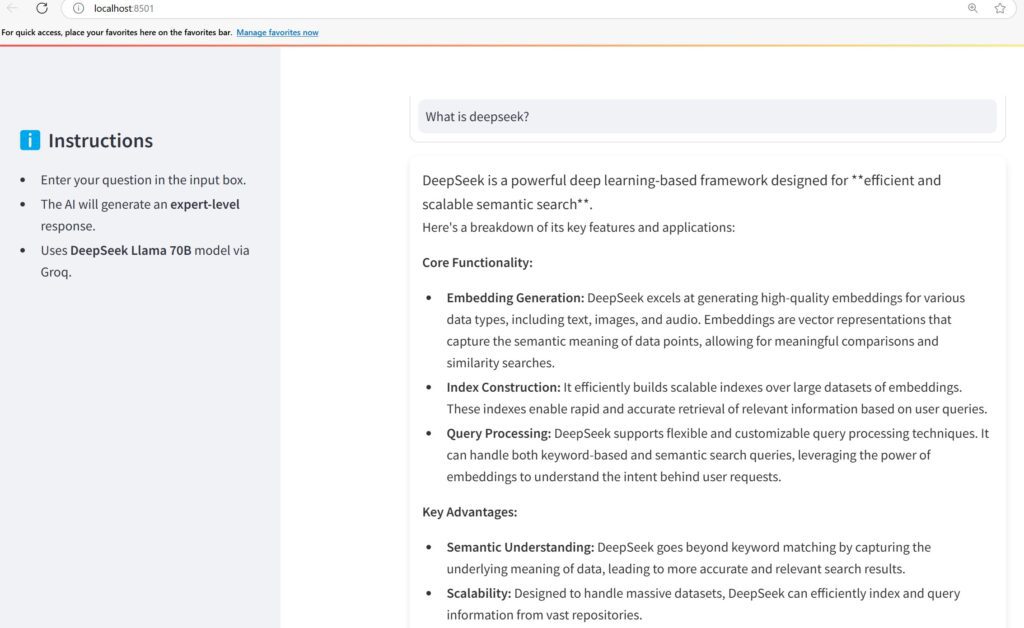
Figure 2: Example response generated by the DeepSeek LLM model
What We Built
We just created a powerful AI Q&A app using three amazing tools:
- DeepSeek: A free, high-performance LLM that rivals paid models
- LangChain: The framework that connects everything seamlessly
- Streamlit: The tool that turned our Python code into a beautiful web app
Whether you're new to AI or an experienced developer, this project shows how modern tools make it easy to build intelligent, user-friendly applications. The possibilities are endless—what will you build next?
References And Further Readings
Build RAG application using DeepSeek and langchain
Build Chatbot Using Ollama And Langchain
Frequently Asked Questions
What is DeepSeek?
DeepSeek is a free AI Chatbot for tasks like math and coding. It is as powerful as OpenAI’s o1 model, uses less memory, and is more cost-efficient. The development cost of DeepSeek is just around $6 million compared to the $100 million used by OpenAI to create GPT-4.
What is LangChain?
LangChain is an open-source framework that connects the large language models with data sources. We can quickly build innovative applications with easy integration and memory for context using Langchain.
How does Streamlit help with AI apps?
By using Streamlit, we can quickly build Python scripts into interactive web apps. It helps us to focus solely on our AI models while it takes care of the interface.